
You have a folder of PDFs, notes and policies, and you keep searching it with Ctrl+F. In this tutorial you build a small app that answers questions from that folder in plain English, tells you which file each answer came from, and says “I can’t find that” instead of making things up. It runs entirely on your laptop. No account, no API key, and nothing leaves your machine.
The technique is called RAG, short for retrieval-augmented generation. We build it from scratch in about 120 lines of Python, so you can see every moving part. We don’t use a framework.
What you will build
A command-line app with three commands: index reads your documents, ask answers one question, and chat keeps a conversation going. Here is real output from our run, using four sample documents for a made-up bike shop:
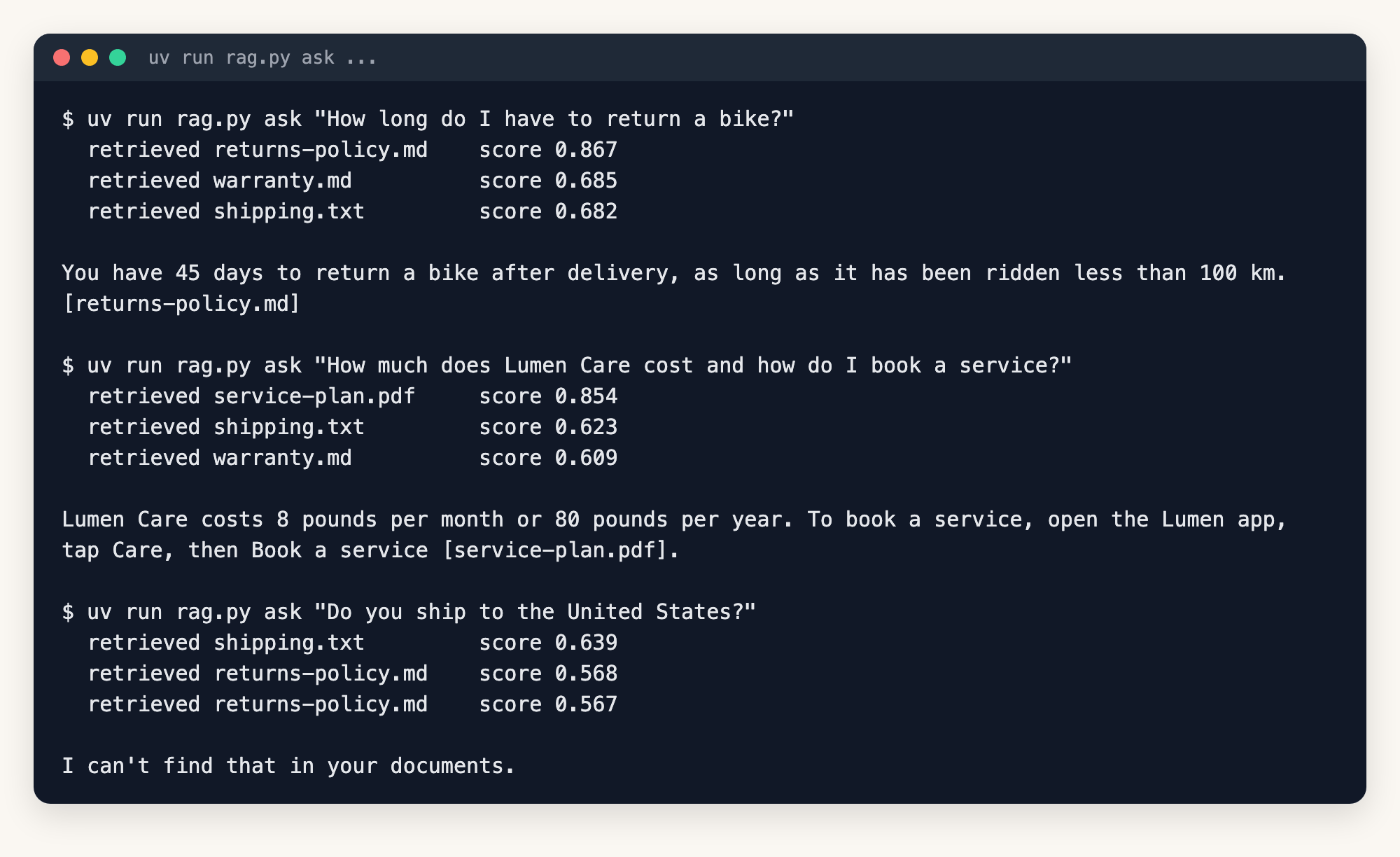
Notice the last question. The documents never mention the United States, so the app says so instead of guessing.
What you need
- A Mac, Linux or Windows laptop. We tested on macOS 27.0.1 with an Apple M3 Pro. While answering, the chat model used 3.2 GB of memory (measured with
ollama ps), so 8 GB of RAM should be enough. - About 3 GB of disk space for the two models.
- Ollama, which runs the models. We used version 0.40.17.
- Python 3.12 or newer and uv to manage packages. We used uv 0.7.13.
- Time: about 20 minutes, most of it spent downloading.
- Cost: free. Everything here is open source or open-weight and runs locally.
Step 1: Pull two local models
RAG needs two models. An embedding model turns text into a list of numbers, so similar meanings end up close together. A chat model writes the answer.
ollama pull nomic-embed-text
ollama pull qwen3:4b-instruct
Each command ends with success. ollama list should then show both:
qwen3:4b-instruct          0edcdef34593    2.5 GB    ...
nomic-embed-text:latest    0a109f422b47    274 MB    ...
We chose qwen3:4b-instruct and not plain qwen3:4b for a reason you can read about under Troubleshooting. ollama show nomic-embed-text reports 137M parameters and an embedding length of 768, so each chunk of text becomes 768 numbers.
Step 2: Create the project
mkdir local-rag && cd local-rag
uv init --no-workspace --python 3.12 .
uv add ollama numpy pypdf
This installs three packages. We got ollama 0.6.3 (the Python client), numpy 2.5.5 (for the vector math) and pypdf 7.1.1 (to read PDFs). That’s the whole stack. There’s no vector database, because a few thousand chunks fit comfortably in a NumPy array.
Step 3: Add some documents
Put your own .md, .txt or .pdf files in a docs/ folder. To follow along exactly, create the sample files we used. They describe a fictional company, so the model can’t answer from its training data and has to read them.
mkdir docs
cat > docs/returns-policy.md <<'EOF'
# Returns policy (Lumen Bikes, fictional example company)

You can return any bike within 45 days of delivery for a full refund, as long as it has been ridden less than 100 km.

Accessories such as helmets, lights and locks can be returned within 30 days if they are unused and in the original packaging.

To start a return, email [email protected] with your order number. We send a prepaid shipping label within two working days.

Refunds go back to the original payment method within 7 days of the bike arriving at our warehouse in Leeds.

Custom-painted frames cannot be returned unless they arrive damaged.
EOF
cat > docs/warranty.md <<'EOF'
# Warranty (Lumen Bikes, fictional example company)

Every Lumen frame has a 10-year warranty against manufacturing defects. The warranty covers the original owner only.

Components such as brakes, gears and the battery are covered for 2 years.

The e-bike battery is guaranteed to keep at least 70% of its capacity for 2 years or 500 full charge cycles, whichever comes first.

Crash damage, rust caused by storing the bike outside, and wear parts (tyres, brake pads, chain) are not covered.

To make a claim, send a photo of the problem and your frame number to [email protected]. The frame number is stamped under the bottom bracket.
EOF
cat > docs/shipping.txt <<'EOF'
Shipping (Lumen Bikes, fictional example company)

We ship to the UK, Ireland and the EU. Bikes leave our Leeds warehouse within 3 working days of the order.

UK delivery is free and takes 2 to 4 working days. EU and Ireland delivery costs 49 euros and takes 5 to 8 working days.

Bikes arrive 90% assembled. You need to attach the handlebar and pedals; a 15 mm pedal spanner and the hex keys are in the box.

We cannot ship e-bike batteries to islands that are only reachable by air, because of battery transport rules.
EOF
For the PDF, drop any PDF of your own into docs/. We made ours, service-plan.pdf, by saving a short web page as a PDF from Chrome. It says Lumen Care costs 8 pounds a month or 80 a year and explains how to book a service in the app.
Step 4: Write the RAG app
Create rag.py with this code. The comments mark the five stages: load, chunk, embed, retrieve, generate.
"""Chat with your own documents, fully offline, using Ollama.

usage:
  uv run rag.py index docs/          # read, chunk and embed every .md/.txt/.pdf file
  uv run rag.py ask "your question"  # answer one question from your documents
  uv run rag.py chat                 # keep asking until you type 'quit'
"""
import json
import pathlib
import sys

import numpy as np
import ollama
from pypdf import PdfReader

EMBED_MODEL = "nomic-embed-text"
CHAT_MODEL = "qwen3:4b-instruct"  # the non-thinking variant: answers straight away
INDEX_FILE = pathlib.Path("index.npz")
CHUNKS_FILE = pathlib.Path("chunks.json")
CHUNK_CHARS = 600   # roughly 120-150 words per chunk
TOP_K = 3           # how many chunks we hand to the model


# ---------- 1. load ----------------------------------------------------------
def read_file(path: pathlib.Path) -> str:
    if path.suffix.lower() == ".pdf":
        return "\n\n".join(page.extract_text() or "" for page in PdfReader(path).pages)
    return path.read_text(encoding="utf-8")


# ---------- 2. chunk ---------------------------------------------------------
def chunk(text: str, size: int = CHUNK_CHARS) -> list[str]:
    """Split on blank lines, then pack paragraphs into chunks of about `size` characters."""
    paragraphs = [p.strip() for p in text.split("\n\n") if p.strip()]
    chunks, current = [], ""
    for p in paragraphs:
        if current and len(current) + len(p) > size:
            chunks.append(current)
            current = ""
        current = f"{current}\n\n{p}".strip()
    if current:
        chunks.append(current)
    return chunks


# ---------- 3. embed ---------------------------------------------------------
def embed(texts: list[str], prefix: str) -> np.ndarray:
    # nomic-embed-text expects a task prefix: "search_document: " or "search_query: "
    resp = ollama.embed(model=EMBED_MODEL, input=[prefix + t for t in texts])
    vecs = np.array(resp["embeddings"], dtype=np.float32)
    return vecs / np.linalg.norm(vecs, axis=1, keepdims=True)  # unit length, so dot = cosine


def build_index(folder: str) -> None:
    records = []
    for path in sorted(pathlib.Path(folder).rglob("*")):
        if path.suffix.lower() not in {".md", ".txt", ".pdf"}:
            continue
        pieces = chunk(read_file(path))
        records += [{"source": path.name, "text": t} for t in pieces]
        print(f"  {path.name}: {len(pieces)} chunk(s)")
    if not records:
        sys.exit(f"No .md, .txt or .pdf files found in {folder}")
    vectors = embed([r["text"] for r in records], "search_document: ")
    np.savez(INDEX_FILE, vectors=vectors)
    CHUNKS_FILE.write_text(json.dumps(records, indent=1))
    print(f"Indexed {len(records)} chunks, {vectors.shape[1]} dimensions each -> {INDEX_FILE}")


# ---------- 4. retrieve ------------------------------------------------------
def retrieve(question: str, k: int = TOP_K) -> list[dict]:
    if not INDEX_FILE.exists():
        sys.exit("No index yet. Run: uv run rag.py index docs/")
    vectors = np.load(INDEX_FILE)["vectors"]
    records = json.loads(CHUNKS_FILE.read_text())
    q = embed([question], "search_query: ")[0]
    scores = vectors @ q
    best = np.argsort(scores)[::-1][:k]
    return [{**records[i], "score": float(scores[i])} for i in best]


# ---------- 5. generate ------------------------------------------------------
SYSTEM = (
    "You answer questions using ONLY the context below. "
    "After each fact, cite the file it came from in square brackets, like [warranty.md]. "
    "If the context does not contain the answer, say: I can't find that in your documents."
)


def answer(question: str) -> None:
    hits = retrieve(question)
    for h in hits:
        print(f"  retrieved {h['source']:<20} score {h['score']:.3f}")
    context = "\n\n".join(f"[{h['source']}]\n{h['text']}" for h in hits)
    stream = ollama.chat(
        model=CHAT_MODEL,
        messages=[
            {"role": "system", "content": SYSTEM + "\n\nContext:\n" + context},
            {"role": "user", "content": question},
        ],
        options={"temperature": 0,      # same question, same answer
                 "num_ctx": 4096},      # small context window = less RAM; plenty for 3 chunks
        stream=True,
    )
    print()
    for part in stream:
        print(part["message"]["content"], end="", flush=True)
    print("\n")


if __name__ == "__main__":
    cmd = sys.argv[1] if len(sys.argv) > 1 else ""
    if cmd == "index" and len(sys.argv) == 3:
        build_index(sys.argv[2])
    elif cmd == "ask" and len(sys.argv) >= 3:
        answer(" ".join(sys.argv[2:]))
    elif cmd == "chat":
        while (q := input("You: ").strip()).lower() not in {"quit", "exit", ""}:
            answer(q)
    else:
        print(__doc__)
Step 5: Index your documents
uv run rag.py index docs/Our output:
  returns-policy.md: 2 chunk(s)
  service-plan.pdf: 1 chunk(s)
  shipping.txt: 1 chunk(s)
  warranty.md: 2 chunk(s)
Indexed 6 chunks, 768 dimensions each -> index.npz
This took under 3 seconds on our Mac. You now have two files: index.npz holds the vectors and chunks.json holds the text each vector came from. Run the command again whenever you add or change documents.
Step 6: Ask questions
uv run rag.py ask "How long do I have to return a bike?" retrieved returns-policy.md score 0.867
retrieved warranty.md score 0.685
retrieved shipping.txt score 0.682
You have 45 days to return a bike after delivery, as long as it has been ridden less than 100 km. [returns-policy.md]The score lines show what the retriever found. They are cosine similarities between your question and each chunk, so higher means closer in meaning. The best match scored clearly higher than the other two, and the answer cites that file.
Now try a question the documents can’t answer:
uv run rag.py ask "What is the capital of France?" retrieved shipping.txt score 0.466
retrieved returns-policy.md score 0.431
retrieved warranty.md score 0.428
I can't find that in your documents.The model certainly knows the answer, but the system prompt limits it to your documents. Every score is also lower than in the first example. That is a useful signal you can build on (see “Make it yours”).
For a conversation, use chat:
$ uv run rag.py chat
You: Where is the frame number?
  retrieved warranty.md          score 0.706
  retrieved returns-policy.md    score 0.600
  retrieved warranty.md          score 0.536

The frame number is stamped under the bottom bracket. [warranty.md]

You: Can I return a custom-painted frame?
  retrieved returns-policy.md    score 0.892
  ...
You can return a custom-painted frame only if it arrives damaged. If it is not damaged, it cannot be returned under the returns policy. [returns-policy.md]

You: quit
Each answer took between 1.2 and 4.4 seconds of wall-clock time in our run, measured with /usr/bin/time and including Python start-up. A slower laptop will take longer.
How does RAG work?
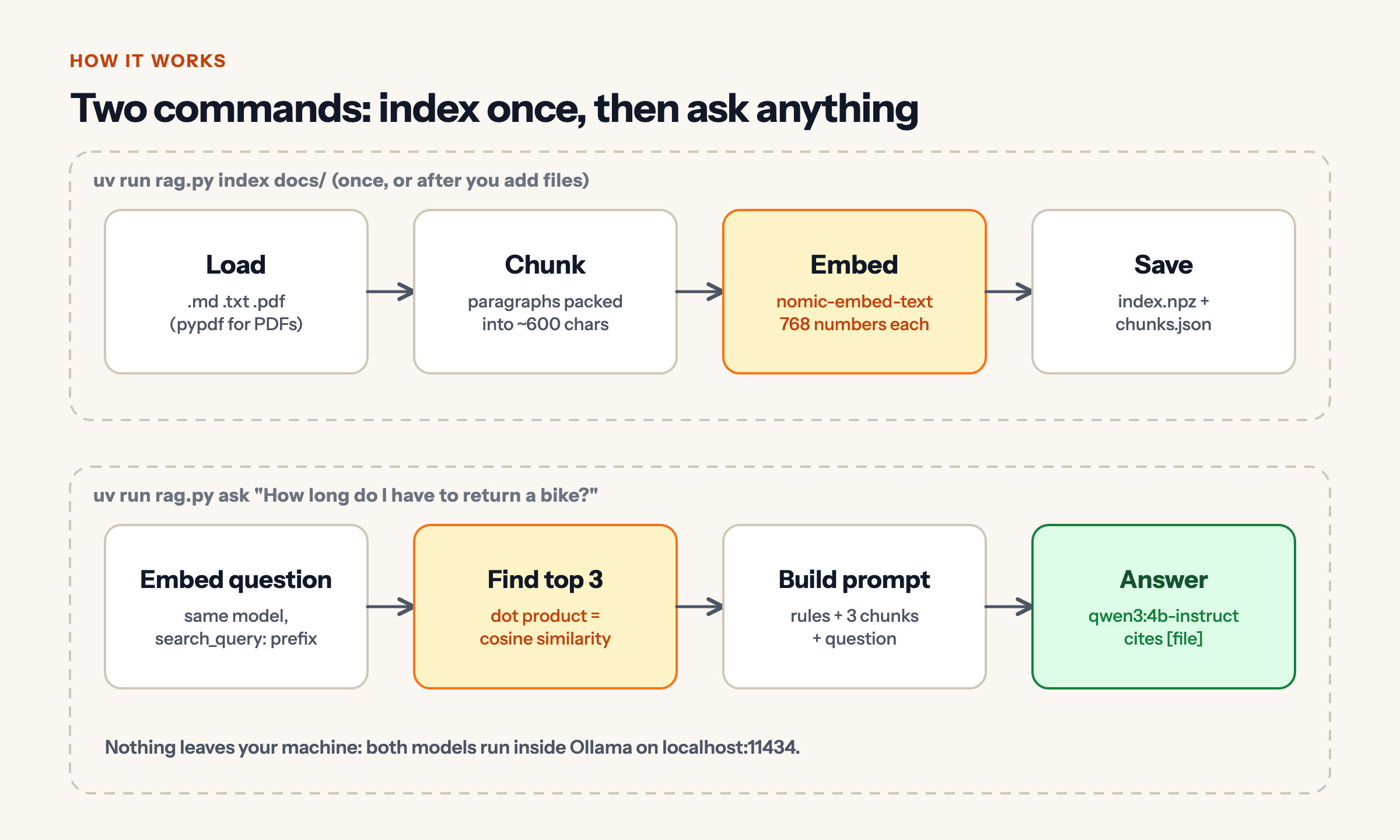
There are two phases.
Indexing (once). The app reads each file, splits it into paragraph-sized chunks of about 600 characters, and asks nomic-embed-text for a 768-number vector per chunk. It scales each vector to length 1 and saves it.
Asking (every question). The app embeds your question the same way and multiplies it against every stored vector. Because all vectors have length 1, that product is the cosine similarity. It takes the three best chunks, labels each with its file name, and puts them in the prompt with strict rules: answer only from this context, cite the file, admit when the answer is missing. The chat model only ever sees those three chunks, not your whole folder. That’s why this works with a small 4-billion-parameter model.
One detail is easy to miss. The nomic-embed-text model card says to prefix documents with search_document: and queries with search_query: for RAG. Our code does both. Skip the prefixes and retrieval still runs, but you are not using the model the way it was trained.
Troubleshooting
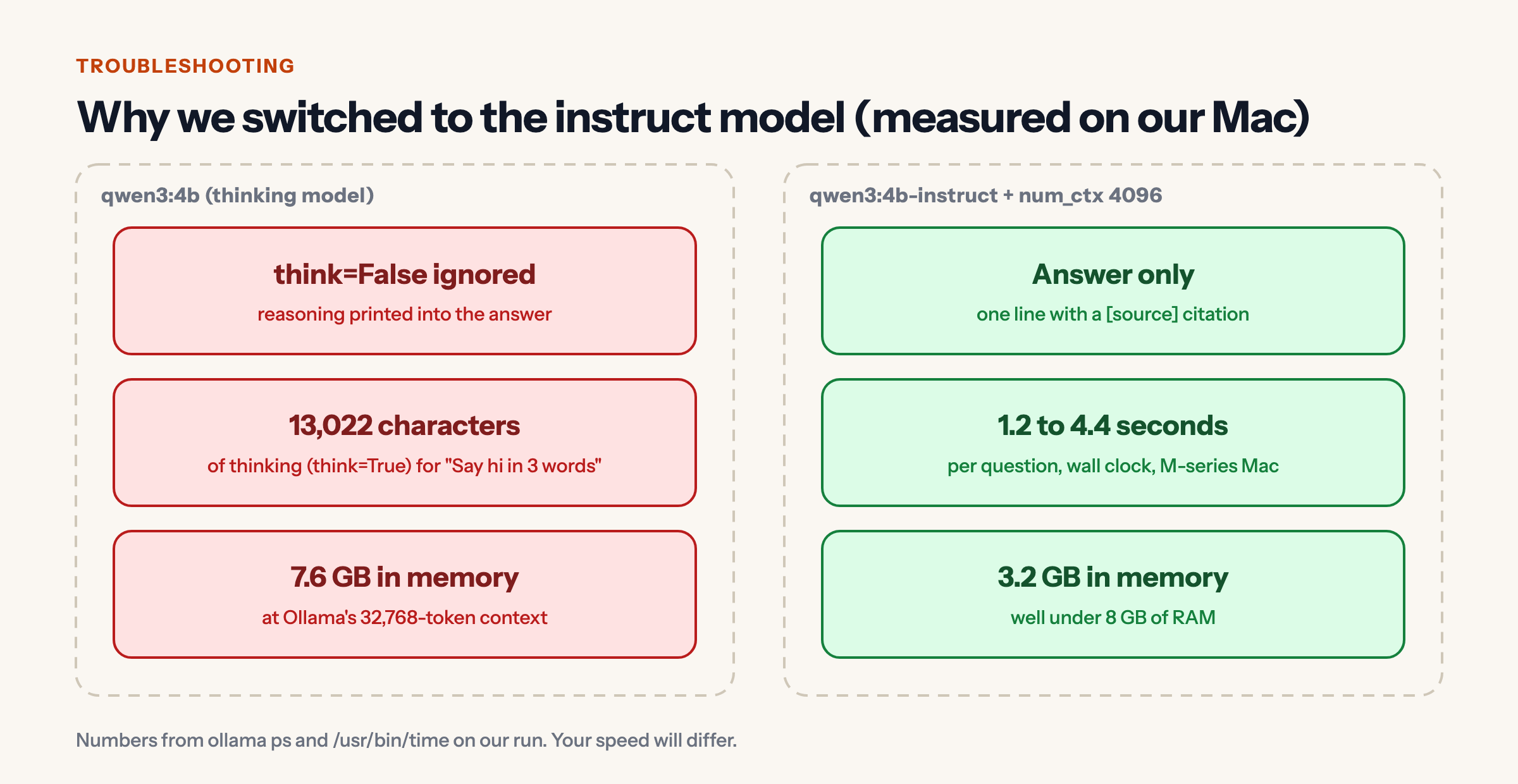
The answer starts with “Let me analyze the context…” and ends with </think>. We hit this first. We started with qwen3:4b, which is a thinking model. With think=False, the reasoning was not switched off. It came back mixed into the answer as plain text, followed by a stray </think> tag. With think=True, the reasoning moved into a separate thinking field, but one “say hi in three words” test produced 13,022 characters of it before the three-word reply. The fix is the instruct build, qwen3:4b-instruct, which the Ollama library lists as the non-thinking variant. Its answers are a single cited line.
Memory use is much higher than the model size. ollama ps showed qwen3:4b using 7.6 GB with a 32,768-token context window, although the download is only 2.5 GB. Most of the extra memory goes to the context window. Three chunks plus a question need far less, so we set "num_ctx": 4096. With that setting, qwen3:4b-instruct used 3.2 GB.
ollama._types.ResponseError: model 'nomic-embed-txt' not found (status code: 404). There’s a typo in the model name, or you never pulled it. Run ollama list and copy the name exactly.
No index yet. Run: uv run rag.py index docs/. You ran ask before index, or from a different folder. The index files are saved in the folder you run the command from.
A confident answer that is subtly wrong. This one is not an error message, and it matters most. Asked “Is my e-bike battery covered if it loses capacity?”, our model replied that it is covered “as long as it loses at least 70% of its capacity.” The document says the opposite: the battery is guaranteed to keep at least 70%. Retrieval found the right chunk, and the small model then misstated it. RAG cuts down on invented facts but does not remove mistakes, which is why the app prints sources. For anything important, open the cited file.
A PDF returns zero chunks. pypdf only reads text that is stored in the PDF. Scanned PDFs are images, so you’d need OCR first.
Make it yours
- Refuse early. In our run, off-topic questions scored below about 0.5 and good matches scored above 0.7. Try skipping the model when the best score is below a threshold you choose, and print “not in your documents” straight away. Test the threshold on your own files.
- Show the evidence. Print the first 150 characters of each retrieved chunk under the answer, so a reader can check it, as the battery example shows you should.
- Point it at real documents. Try your course notes, a product manual or a folder of meeting notes. Raise
CHUNK_CHARSfor long, flowing text and lower it for FAQs.
Challenge: build it on your own documents, then tell us in the comments which files you used, what question surprised you, and what score threshold worked best for you.
FAQ
Do I need a GPU or an API key? No. Ollama runs both models on your computer’s CPU or built-in GPU, and nothing in this tutorial calls an online service after the models are downloaded.
Why not LangChain or a vector database? You can add them later. For a personal folder, a NumPy array is fast enough and keeps every step visible. Once you understand these 120 lines, framework code is much easier to read.
Can I use a different model? Yes. Change CHAT_MODEL to any chat model you have pulled. If you switch the embedding model, re-run index, because vectors from different models can’t be compared. We only tested the two models in this post.
Is my data private? The documents, the index and the questions stay on your machine. Ollama listens on localhost:11434 by default.
Summary
You built a local RAG app. It splits your documents into chunks, embeds them with nomic-embed-text, finds the closest chunks for each question, and has qwen3:4b-instruct answer with a file citation, all offline. You also saw two things to watch: pick an instruct model, not a thinking one, and always check a small model’s answer against the cited source.
Keep going with these related posts:
- Create a Narrated Video with a Local LLM (Free, Offline Tutorial): another fully local build.
- MCP explained: the Model Context Protocol in plain English: the next step when you want an agent to use your documents as a tool.
- OpenRouter for beginners: when you want to compare your local answers with larger hosted models.
Sources
- Ollama, Embeddings documentation, https://docs.ollama.com/capabilities/embeddings (checked 23 November 2026)
- Ollama library, qwen3 tags (lists
qwen3:4b-instructas the non-thinking Instruct-2507 variant), https://ollama.com/library/qwen3 (checked 23 November 2026) - Nomic AI, nomic-embed-text-v1.5 model card (task prefixes
search_document:andsearch_query:), https://huggingface.co/nomic-ai/nomic-embed-text-v1.5 (checked 23 November 2026) - All commands, timings, scores and memory figures come from our own run on macOS 27.0.1 (Apple M3 Pro), Ollama 0.40.17, Python 3.12.11, uv 0.7.13, ollama-python 0.6.3, numpy 2.5.5, pypdf 7.1.1.


Join the discussion