Time to build something. Over this course you will make The Rusty Cave, a small text adventure game that runs in the terminal. Each module adds a new feature, using exactly what that module taught you. By the end, it is a real program you can run on your own computer and show off.
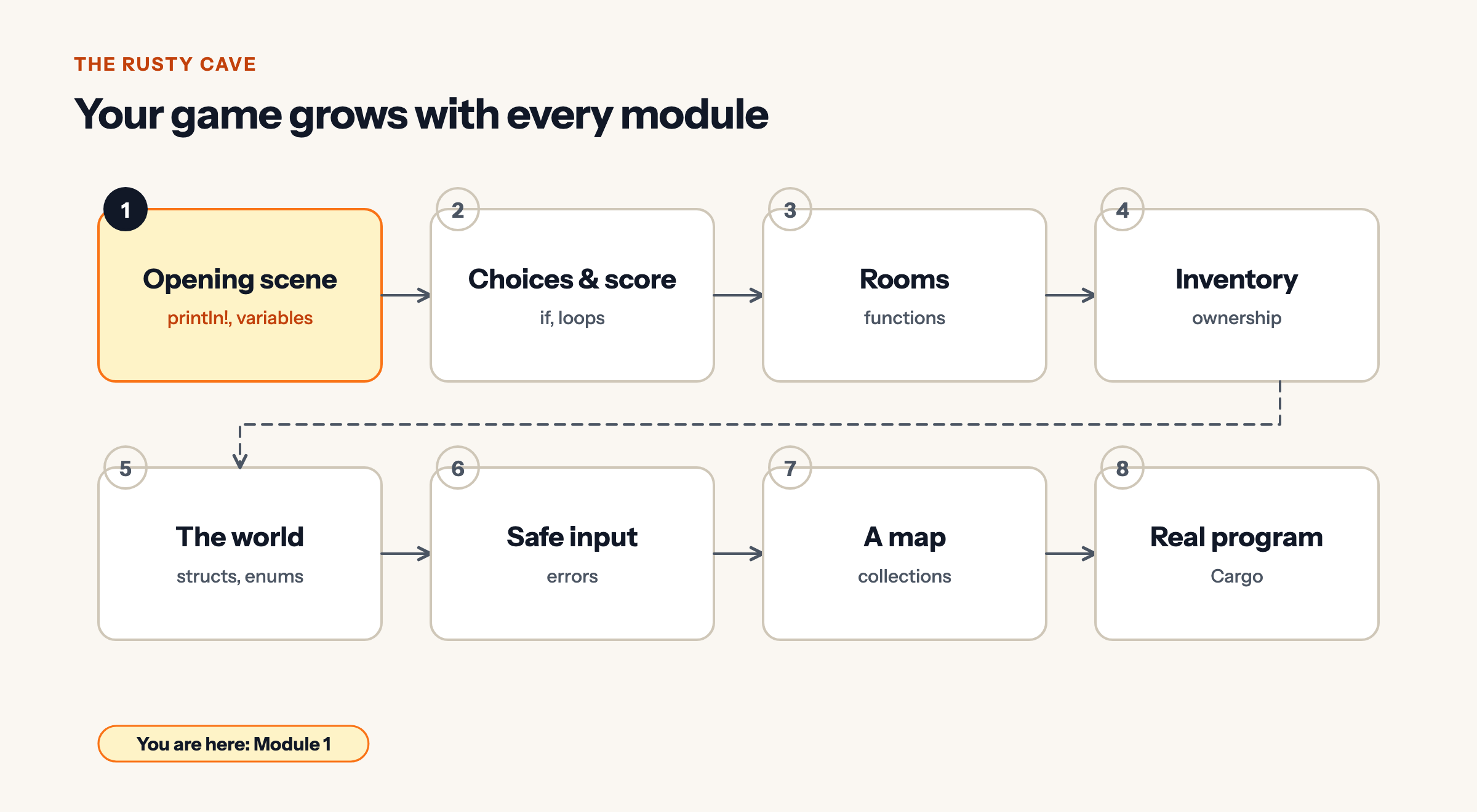
Today: the opening scene. It uses only println!, {} blanks, and variables.
Step 1: a title screen
Start with the title. Run it, then make the title your own.
fn main() {
    println!("==============================");
    println!("        THE RUSTY CAVE        ");
    println!("==============================");
}Expected output
==============================
        THE RUSTY CAVE
==============================
Step 2: the player and their stats
Games are full of values: a name, health, coins. Store them in variables so you can use them anywhere. Notice which ones are mut: the name will not change during the game, but health and coins will.
fn main() {
    let player = "Asha";
    let mut health = 100;
    let mut coins = 0;

    println!("Welcome, {player}.");
    println!("Health: {health}  Coins: {coins}");
}Expected output
Welcome, Asha.
Health: 100  Coins: 0
Run it. Below the output, the compiler prints two warnings (in yellow): variable does not need to be mutable. Warnings are not errors: the program still runs. Rust is pointing out that we made health and coins changeable but never changed them. We will fix that in Step 4.
Step 3: set the scene
A good opening describes where the player is. Use blanks to put the player’s name into the story.
fn main() {
    let player = "Asha";

    println!("You wake up on a cold stone floor, {player}.");
    println!("Water drips somewhere in the dark.");
    println!("A faint orange glow comes from a tunnel to the north.");
}Expected output
You wake up on a cold stone floor, Asha.
Water drips somewhere in the dark.
A faint orange glow comes from a tunnel to the north.
Step 4: something happens
Now the stats change. The player finds a few coins and scrapes a knee on the way. This is exactly what mut is for.
Predict the output
Before you run the full scene below, predict the last line it prints.
fn main() {
    let mut health = 100;
    let mut coins = 0;
    health -= 5;
    coins += 3;
    println!("Health: {health}  Coins: {coins}");
}Show the real output
Health: 95 Coins: 3
Health starts at 100 and loses 5, so it is 95. Coins start at 0 and gain 3, so there are 3. The final println! shows the values after both changes.
The whole opening scene
Here is everything together. Run it, then make it yours: change the name, the story, the numbers. Add a line. Add a variable.
fn main() {
    let player = "Asha";
    let mut health = 100;
    let mut coins = 0;

    println!("==============================");
    println!("        THE RUSTY CAVE        ");
    println!("==============================");
    println!();
    println!("You wake up on a cold stone floor, {player}.");
    println!("Water drips somewhere in the dark.");
    println!("A faint orange glow comes from a tunnel to the north.");
    println!();
    println!("You crawl toward the glow and scrape your knee.");
    health -= 5;
    println!("Something glints in a crack: three old coins!");
    coins += 3;
    println!();
    println!("{:<8}{:>4}", "Health", health);
    println!("{:<8}{:>4}", "Coins", coins);
}Expected output
==============================
        THE RUSTY CAVE
==============================

You wake up on a cold stone floor, Asha.
Water drips somewhere in the dark.
A faint orange glow comes from a tunnel to the north.

You crawl toward the glow and scrape your knee.
Something glints in a crack: three old coins!

Health    95
Coins      3
println!(); with nothing inside prints an empty line, a quick way to space things out. The last two lines use the width trick from Lesson 1.2 to line the stats up.
Challenge: make it yours
Pick one or more, run your version, and tell us what you made in the comments.
- Add a
torch_lightvariable that starts at10and goes down by2when the player crawls. - Add a second discovery (a key? a map?) and a line that announces it.
- Use shadowing to make a
titlevariable that starts as"THE RUSTY CAVE", then becomes"THE RUSTY CAVE: PART 1", and print it on the title screen.
Quick check
Quick check
-
Only values that need to change get mut. Leaving player locked means it can never change by accident.
-
Warnings are advice. Errors stop the build; warnings do not.
-
An empty println! still ends the line, so you get a blank line.
Module 1 recap
You can now run Rust programs, print text and values, use placeholders and widths, store values in variables, change them with mut, and reuse names with shadowing. That is enough to build a real opening scene.
Next, Module 2 (coming soon): numbers and text in depth, if and else for choices, and loops. Your game will let the player make a choice.
Leave a Reply